
Swap your face live on camera, right in your browserStart Live Swap

Camera input

Preview off

Reference style

Pick a style. You, your room and your movement stay; the whole picture is redrawn in that style. The tile shows the style, not who you become.

1 credit per second while the swap runs.

Sign in to start a live swap.

Use your own camera picture. Don't use the result to deceive anyone.

Webcam Filters

Webcam filters that restyle your whole live camera picture with AI, right in your browser.

AI-generated exampleIdle

Your camera video is not recorded or saved, and no other user can see it.

Webcam filters compared: AI, photo booth, virtual camera

Three kinds of tools put a filter on a webcam. They solve different jobs.

This toolPhoto-booth filtersVirtual camera apps
What changesAI restyles the whole frame, so you and your room both changeFixed effects such as vintage, VHS or black and whiteEffects, skin smoothing, backgrounds
Looks to pick from2 presets: comic, 3D cartoonDozens of effectsLarge effect catalogs
InstallNone, runs in a desktop browserNoneAn app or browser extension
Where it runsYour camera video goes to an AI model and back; we never record or save itUsually on your own deviceOn your own computer
Into video callsNo virtual camera; capture the browser windowUsually notYes, that is their purpose
What you keepLive view only, no recording or downloadPhotos, strips, short clipsDepends on the app
CostCredits per second, not on sale yetOften freeFree and paid versions

AI webcam filters: comic and 3D cartoon looks

Two looks, both applied to the whole camera picture.
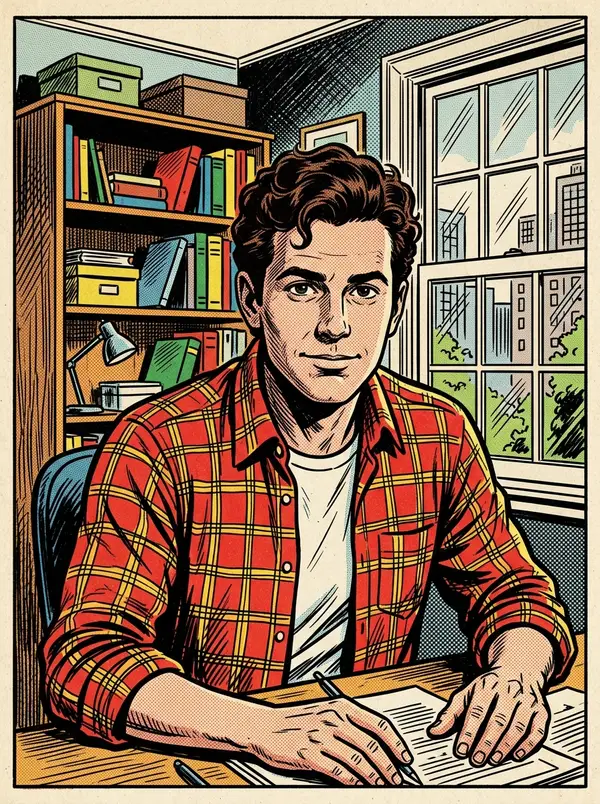
  • Comic book style preset, one of the live AI webcam filters

    Comic book style

    Your live camera turns into a comic-book panel, with you and your room both redrawn in a bold, flat-color style. Pick it when you want a look that reads clearly on a small stream window or a screen recording of your own.
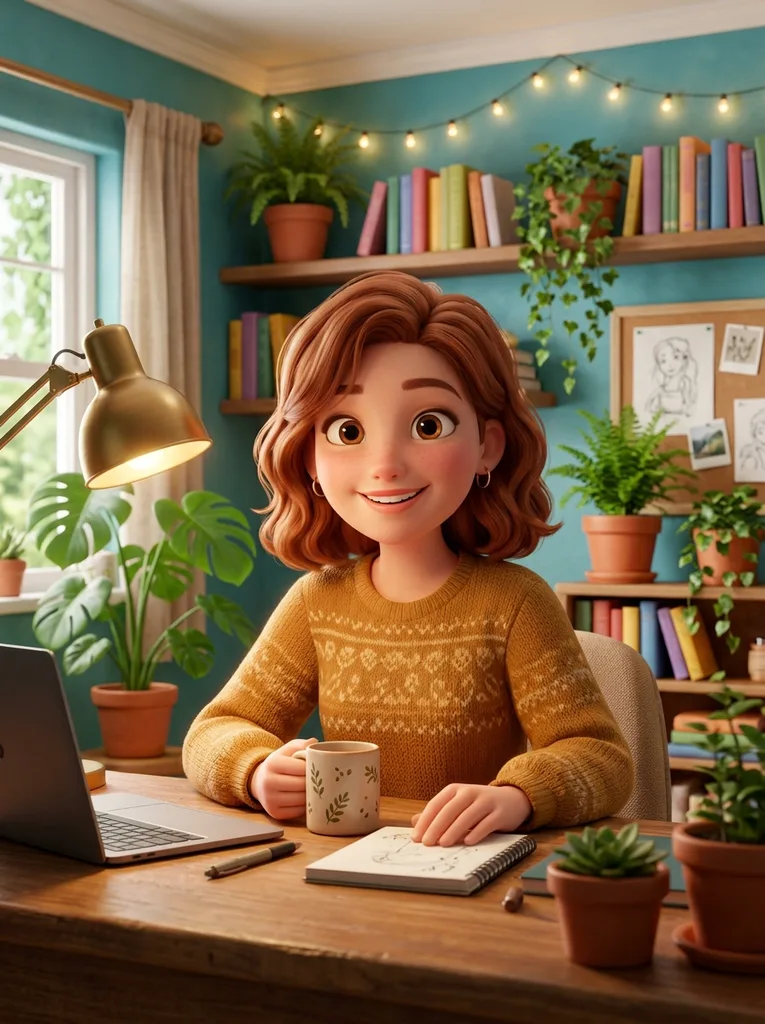
  • 3D cartoon style preset, one of the live AI webcam filters

    3D cartoon style

    A soft, rounded 3D animation look. In our tests this preset also changed hair color and swapped the room for a cartoon scene, so expect more than a face change. Pick it when you want a friendlier, film-like character feel.

How to add webcam filters in your browser

Three steps in a desktop browser, no install.

  1. 1

    Open your camera

    Allow camera access and a preview of your webcam appears. Starting a filter needs an account; the preview does not. Use a desktop browser with a laptop or USB webcam, and sit in even light.

  2. 2

    Pick comic or 3D cartoon

    Choose one of the two looks. You can switch while it runs; in our tests the new look showed in about 4 seconds.

  3. 3

    Start the live filter

    Press Start Live Filter. In our tests the first picture arrived in about 4 to 8 seconds, then ran about half a second behind your camera. Press Stop to end the session. Check the result against your real camera, since it is AI output.

Frequently asked questions

One credit per second, charged only while it runs, for up to 30 minutes per session. If no picture appears within 20 seconds, the session is not charged. Credits are not on sale yet, and the page offers an email waitlist.

Not as a camera. There is no virtual camera, app or extension: the filtered video plays only on this page, so Zoom cannot pick it as a camera; share the browser window instead, and for OBS capture the window. Phones are untested: the tool is tested in desktop browsers with a laptop or USB webcam.

A photo booth filter lays a fixed effect, such as sepia or VHS grain, over your picture. An AI filter redraws the whole frame in a new style, so you and your room both change. Here that means a comic or 3D cartoon look, live on your camera, with no photo to upload.

No, only on your live camera. There is no photo or video upload for the filter, and nothing is recorded or offered as a download. To keep a clip, record your own screen with other software.

Your camera video is never recorded or saved by us. Your video travels encrypted to the AI model and the filtered picture comes straight back. No other user can see it.

In our tests the filtered picture ran about half a second behind the camera. Keep this tab in front, because browsers slow down video in background tabs.

No. This page has two fixed looks, comic book and 3D cartoon, and no upload. To turn into a character instead of restyling your whole picture, try the camera to cartoon page.

Yes, through window capture. Add the browser window running this page as a source in your streaming software and crop it to the filtered tile. Tell viewers the picture is AI-styled.

Nothing to install. You can open the camera preview without an account, but starting a filter needs one. Use a desktop browser with a laptop or USB webcam.

Up to 30 minutes. Then start again. Closing the tab ends the session, and credits count only while the filter runs. If you want to keep going, press Start Live Filter again for a new session.

Two: comic book style and 3D cartoon style. Both restyle the whole camera picture. The 3D cartoon look can change hair color and swap your room for a cartoon scene, while the comic look redraws the same scene as a comic panel. There are no sliders or other options.

Yes, when you tell viewers the picture is AI-styled and the camera shows only you. The terms ask for 18 or older, and the tool is not for fooling anyone who does not know.

More tools